13 Comments

camera-jumping-through-hoops

Magic Lantern, if you don't already know is a firmware type code that enhances features in your DSLR camera. There's only a few cameras supported at this time, and only so many features are 'unlocked' for each one. When it was first released, it caused quite a stir, but Canon has since updated their firmware to resolve some of these issues. For instance manual audio levels and 24p in the Canon 5D Mark II came after these features were already unlocked with the Magic Lantern firmware. The code is stored on the Media card, so after rebooting - the camera returns to it's normal self. This doesn't mean that it's entirely safe (although i've never heard of any problems using it). The code that starts running as soon as you go through the steps of booting up from it will make your camera do tricks it wasn't originally designed to do including run faster and run harder.

This time around Trammell Hudson the man behind the madness has added a new upgrade to the 5D Mark II firmware to run the video bitrate up to 76Mbps chasing the popular hack for the GH1. This still might be a bit too high for the Canon 5D Mark II camera without over buffering, so a sustained 70Mbs in 24p looks to be more manageable. There's options from 7Mbps (low quality) and several in between up to the 76MBps (OEM is normally about 40Mbps). Hey i'd take a sustained 50-60Mbps, which would already make a huge difference. Of course depending on the amount of information the camera absorbs that might change. Static shots compared to running, fast moving subjects, and fast exposure changes will all play a role in the amount of information being processed. It's an all free download, but of course if you're interested in the hard work Trammell has been doing for the DSLR video community, you can always drop a donation found on the Wikia page. For more information and other features that you can unlock from your DSLR check out the Wikia https://magiclantern.wikia.com/wiki/Magic_Lantern_Firmware_Wiki.

Yo Trammell, let's see some action on the Canon 7D as it appears to have the dual processors and the only camera capable of outputting 1080 through HDMI. I'm hoping this translates to a camera that can process more than 76Mbps too....

169 Comments

I've talked about this particular video camera stabilizer before, and have been suggesting it to many people. In my older posts i've always shown demo videos of other people using this Flycam Nano stabilizer. This time around, i'm actually doing the demo. It's an affordable stabilizer with a Gimbal bearing handle that has more range of motion than the Hague MMC or IndieHardware. It's more expensive than the IndieHardware and about the same price of the Hague (if not cheaper) depending on where you live and shipping costs. It can also carry much more weight than both the Hague MMC and IndieHardware stabilizer. The design is similar to the Glidecam series of stabilizers, and it's possible it can carry the same weight as the Glidecam HD1000 which is 3 times the price.

flycam-nano (3 of 11)
Flycam Nano next to Glidecam HD4000

The Flycam Nano is a cheaper stabilizer not only because it's coming from overseas manufacturing, but also because it doesn't spend on fancy aesthetics. The weights used on the sled (lower tray) of the stabilizer are just large washers with a wing-nut and bolt combo. The finish of the whole unit looks like it's some type of hard flat black paint as opposed to higher end units that use a flat black anodizing process. Don't get me wrong, there's nothing that feels like plastic. It appears to be an all metal rig. Unlike the the Glidecam HD1000 there are also no simple fine tuning knobs. To balance this stabilizer, you'll need to loosen all the thumb screws, shift the plates, recheck and try again if it's still off. With any stabilizer, this could be a time consuming and frustrating process especially for those who aren't familiar with balancing a stabilizer. For myself who has balanced many other stabilizers, it took me less than a minute. Of course, the first time I balanced a Glidecam it literally took me several hours. I've learned to understand what to look for when balancing my cameras, and practice makes perfect.

I'm very impressed with this stabilizer and the amount of weight it can carry. I'm only using 5 of the weights on each side and the unit shipped with 10 on each side. With the amount of weight I have on there now, it doesn't feel like the unit is struggling. I'm flying the Canon 60D with a Sigma 20mm Prime lens. The Flycam Nano I ordered also came with several extra parts including extra rubber feet and wing nuts. It was packaged nicely in a box of solid foam with cut outs. There are a few parts on the unit i'm planning to upgrade like the screws that hold the weights, and changing out the wing nuts to fancier clamp knobs. There's also a small hex screw that holds the top stage to the post that seems to work it's way loose after a while. A simple lock washer will prevent this from coming loose. It also lacks any type of quick release system to remove your camera when traveling. I'll be placing a Quick release adapter to the top of this unit.

flycam-nano (7 of 11)
Minimal Parts for easy Travel

It's super compact and if you decide to take it apart will fit into a small bag. It's a really fun stabilizer, and i'm hoping to shoot something worth watching. If you have any questions for me at this point, leave them in the comments section. You can also check out the earlier related posts showing more examples of the Flycam Nano in use.

flycam-nano-video-stabilizer
find-price-button Flycam Nano DSLR Video Camera Stabilizer

Related Articles:
http://cheesycam.com/flycam-nano-now-available/

15 Comments

The LP-E6 is the battery type used in the Canon 60D, 7D, and Canon 5D Mark II. This AC power adapter will power your camera from any AC outlet. There's usually several cameras going at one time and to compliment the stationary tripod shots in the studio, I decided these AC adapters help save me time from charging batteries. I can use my other batteries for the more mobile cameras. Having constant power to a few cameras is also one less thing to worry about when we've got only two guys manning 4-5 cameras. As you can see the cords are very long, so even without an extension cord, they are quite usable on it's own. These cameras don't require much power, and I verified that it works with my little portable $99 dollar battery pack which should give me more than a full day's worth of power. Extended Timelapse shooting? You'll probably think about something like this. If you're in studio, or even on constant location shoots with a static tripod shot, a battery pack and this ACK-E6 battery adapter is definitely a handy thing to have in the bag in case you run low on batteries....

If you're not using a battery grip, you can get away with some of the inexpensive versions running around $20 dollars. If you're using a battery grip, some of the aftermarket types don't work well and the battery door won't close properly. That's why I went with the OEM.

canon-ack-e6
find-price-button Canon ACK-E6AC Adapter Kit for Canon 5D Mark II Digital SLR

Canon T2i / 550D owners are in luck, as the OEM ACK-E8 power adapter is much cheaper than the ones for the 60D, 7D, and 5D Mark II.
ack-e8-t2i-adapter
find-price-button ACK-E8, AC Adapter Kit for EOS Rebel T2i Digital SLR Camera

4 Comments

Sure it's not DSLR, but if you're working with a camera that lacks 60p, you might want to take a look at the Panasonic TM700. For those shooting sports and loving that whole slow motion look, this cheap little video camera might help add to your work flow. Vimeo member iamkalaniprince just posted this video up showcasing Panasonic's ability to provide smooth slow motion playback with Image Stabilization already built in to help with your hand-held shots. Camcorders are well known for their fast auto focus compared to DSLR's which makes this perfect for fast moving subjects. Not to mention it's got a bit of a zoom range in a tiny lightweight package. There's a built in 32GB hard drive, but also supports SDHC for more storage. Filter ring support for those ND and CPL's, Microphone input support and headphone monitoring are also nice additions, along with a crazy 3.45-41.4mm f/1.5-2.8 Leica lens (yeah they dropped the Leica name). You won't be coming in with the same Depth of Field look as a DSLR and possibly lack the low light abilities, but for an outdoor fast moving shoot that you can turn into butter smooth slow motion this looks like a fun little video camera. I'm waiting for someone to throw this footage into Twixtor next.

Here's a Low Light Sample from iamkalaniprince

panasonic-tm700
find-price-button Panasonic HDC-TM700 High Definition Camcorder at B&H Photo Video

19 Comments

I've received several comments and emails about how well these FD lenses actually work. For those who are chasing that DOF look, old vintage lenses can get you there on a budget. You'll often hear that these lenses aren't as sharp as digital EF mounts, but that's going about it all wrong. Sure they aren't uber sharp, but with moving pictures it can provide a more classic Cinema feel than overly sharp lenses. Many of these lenses can give you this certain artistic look starting at only $20 dollars. I think the best comment left on this blog was 'Take them for what they are'. They can really blow out a background, especially this 200mm prime lens at F/4. Sure you can find lenses at F/1.2 but you have to also factor lens distance, subject focal distance, and background distance from subject. Get the right combination, and F/4 can provide a really nice blurred look to that background. Keep in mind too that the 60D with this FD adapter turns this 200mm into a crazy focal length of 320mm+ at F/4.

canon-fd-lens-bokeh

There's a few things I could have done better in this. My white balance was set to Auto, and perhaps if I set it correctly it could have warmed things up. I didn't have an ND filter on so the shutter speed was a bit high. I could have thrown a reflector on the subject to get more balanced lighting under the hat, and a scrim to shade the hot spot. I was also just using the preset Picture style for Portrait on the 60D. I possibly could have shot it in a more flat style and edited in post, but I wanted to show how well the image can be straight from the camera. So hopefully this sample will give you guys an idea of some types of footage that can be achieved. You can find the adapter i'm using back at this article: http://cheesycam.com/the-cheaper-road-to-a-lens-with-f1-2/.

canon-fd-200mm
Click Image for FD Adapter

12 Comments


Old video - The 24-105mm has been upgraded with Stainless Steel Inserts

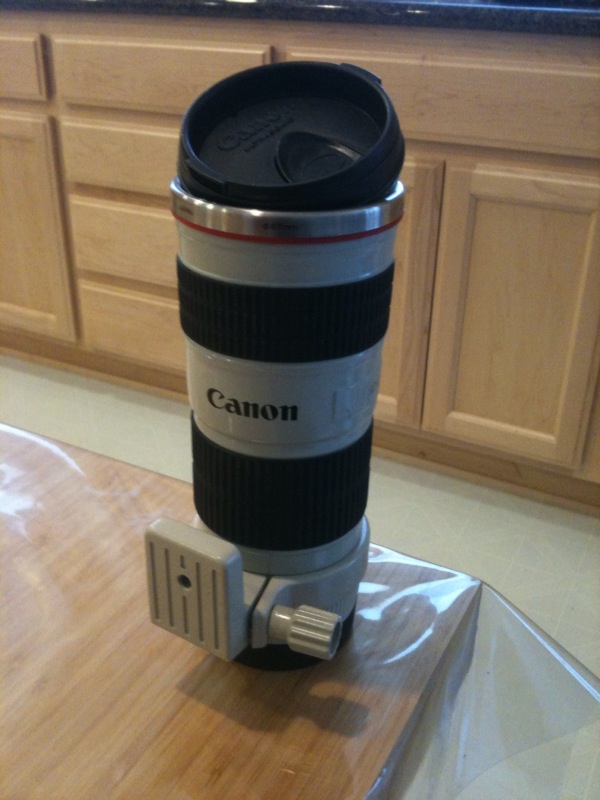
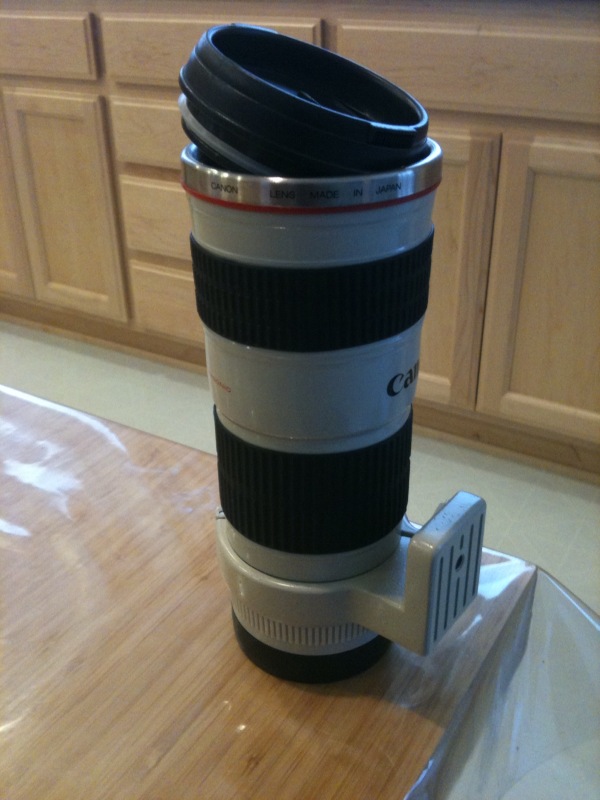
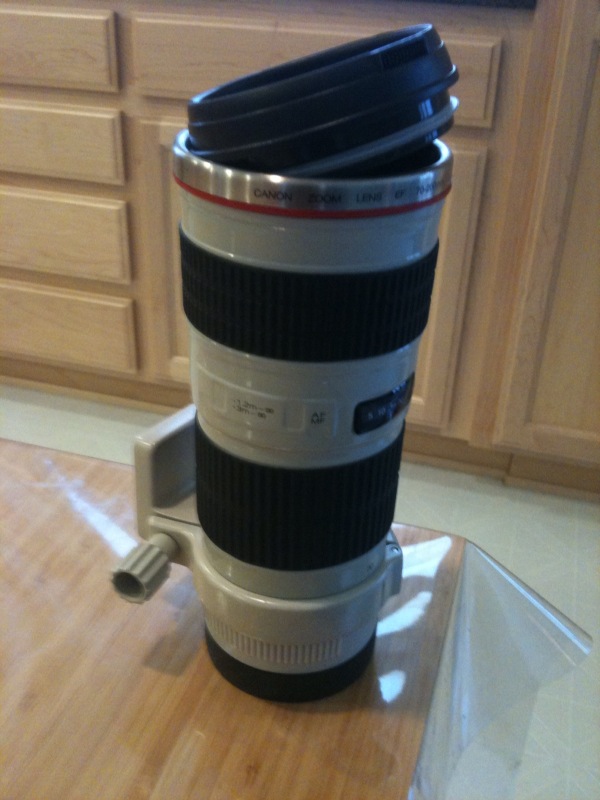
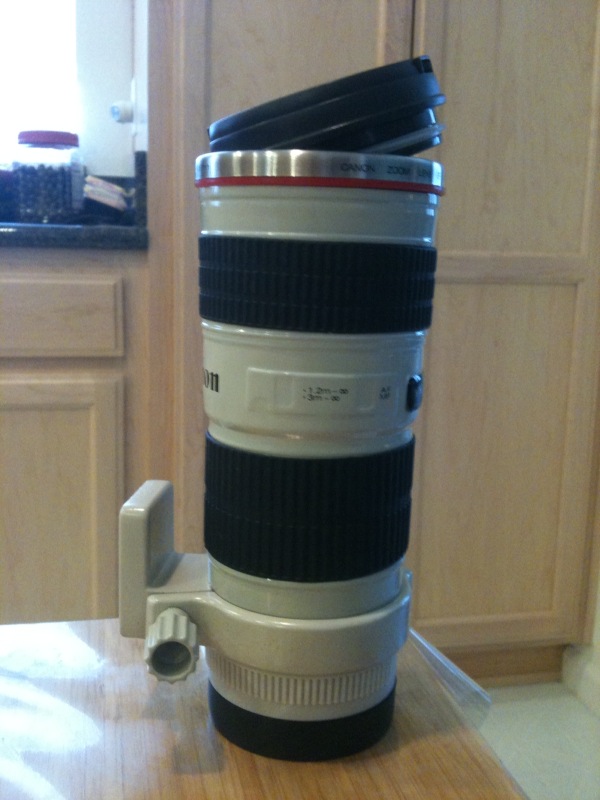
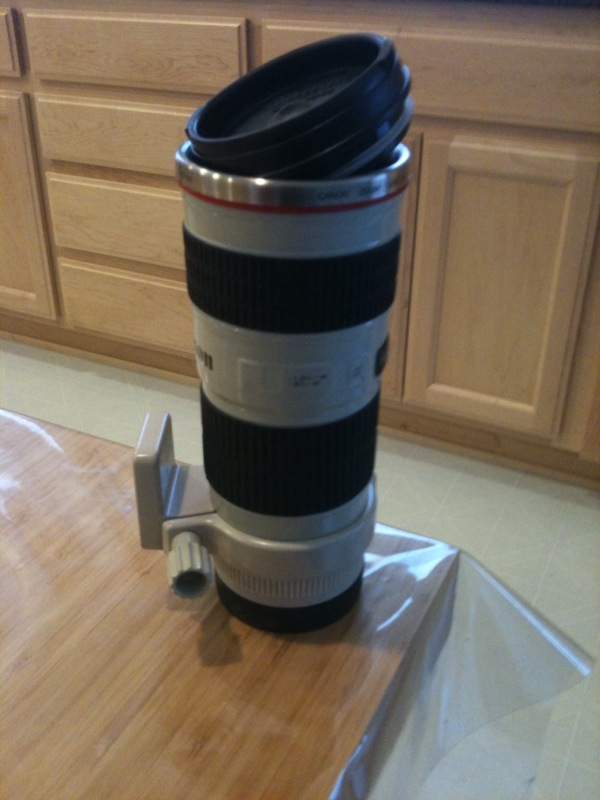
If you're out of gift ideas for what to get your camera geek buddies, you may want to check out the Coffee Mug Lens Replicas. I'm all over this one. After the initial release of the Canon 70-200mm F/4 at the Olympics, there's been quite a few new additions of 'Lens Replica Coffee Mugs' including Nikon versions. The Nikon version i'm showing in my gallery actually 'Zooms' in and out, which is quite whimsical. The details on these replicas are incredible with the recent versions being over 95% detailed to match the real deal. The new versions also include stainless steel inserts for hot beverages, perfect for both Camera lovers and Coffee Drinkers. I have quite a few myself which you can check out in the galleries below. The 24-105mm Lens mug you see in my gallery is the old one. The new Canon 24-105mm F/4 Replica Lens mug now has a stainless steel insert and is more accurate in replica details.

Originally these items were crazy over priced upwards of $100 dollars each with rare finds, but now the the trend has died down and there's more sellers available. The new cheaper prices sometimes found for about $10 dollars for these things make for the perfect Christmas gift for any Camera enthusiast. A gift you know won't end up being recycled back to someone else, LOL. You'll find local sellers that can get you one in short time, but if you're looking to get this by the big Holiday for cheap over seas pricing, you may want to pad for some shipping time and order soon.

nikon-coffee-mug-telephotolens-mug-carrying-bag
find-price-button Nikon Coffee Mug Telephoto Zoom


canon-24-105-lens-mugcanon-lens-mug-replicas
find-price-button Canon Lens Mug Coffee Mug Replica Telephoto Zoom

13 Comments

One of the most popular inexpensive DSLR Video lights would be the CN-126. It's been featured many times on this blog and to this day is still one bargain that's hard to beat. The CN-126 contains 126 LEDs, hence the name 'CN-126'. If you haven't seen it, this article is a good reference: http://cheesycam.com/calling-all-lighting-experts-126-led-lights/. This was probably my first LED Video light for DSLR videography and still have three of them in use today. I carefully selected the CN-126 because it was cheap (at the time was about 350 dollars cheaper than comparables), was the right size, used several different battery types for more power options, and most importantly was 'Dimmable'.

126-led-video-lights
find-price-button 126 LED Dimmable Multi Battery LED Video Lighting

Aside from the 126 LED video light, the family of LED video lights available from this manufacturer include the bigger 160 LED down to the tiniest 48 LED.
160-led-video-light
find-price-button 160 Dimmable LED Video Light

48-LED-Video_light
find-price-button 48 LED Video Lighting Requires 2x AA Batteries

If you've done your research you'll even find the even bigger '183 LED Dimmable Video Light'. The 183 LED Light didn't fly off the shelves like it's smaller siblings, mainly because it was misunderstood. Unfortunate PR, but this also helped to keep prices down. Recently people have been very interested in the 500 LED Video Light Panels, but because of it's really directional light output (a feature of LED lights) small spaces proved to be work in diffusing the light from the larger panel. Another drawback on the 500 LED video light panels is that they work off of an AC outlet. This means you'll need power at your location, and also travel with tangly extension cords and surge protectors. Even if you can modify a small battery, you might be concerned about short run times from larger light panels. This is where the 183 LED Video light was designed for. A smaller unit than the 500 LED panel and packaged with it's own portable rechargeable power source.

183_LED (2 of 4)

Because the 183 LED video light resembled it's smaller siblings, I believe people may have misunderstood it's purpose in life. It's not something that would be totally suitable to use on the hot shoe of a camera for Run and Gun. It's a bigger design and also exclusively uses an external battery pack. Instead, the 183 LED Video light would best be used as a portable video light similar in use as the 500 LED video panels. Throw it on a light stand and take advantage of the portable battery pack (included). The 183 'cannot' use AA batteries internally. There is only a connection for the 12V input. A nice addition is that the battery pack was designed with two outlets to power two 183's giving you hours and hours of LED lighting. Unfortunately due to poor marketing, it's been misunderstood, but you can see the design was to support two lights together with a portable battery solution mainly for stationary use like the 500 LED Video panel.
double-straight-bracket
Straight Bracket with Two Adjustable Flash Shoe Mounts

183_LED (4 of 4)
(above) 183 LED next to 48 LED and Z96 Video LED Light

So if you've been eyeballing those 500 LED video panels but either couldn't afford it, or are turned off by the the lack of 'portable power' options, the 183 LED might fit the bill. You can travel with these lights without worry of an AC outlet and with it's power pack can shoot for several hours worry free. One thing to mention though is that the cord that comes with the unit is fairly short, but would be an easy task to snip down the middle and add some wire in between to extend. The best deal would be to grab a pair and get you up to 366 LEDs of broad diffused light, and two lights can be powered from a single battery. This setup would still be dimmable and each light can still be individually powered on or off. By grabbing a pair, you'd also have a spare battery set aside for even more hours worry free use. Pack all the items into a nice travel case, and you'll be set to add outdoor fill light or indoor studio video lighting wherever you might end up. While this is not a popular item for anyone looking to mount a video light 'on camera', these would work well for building a portable lighting solution set to be used 'off camera'.


183_LED (3 of 4)
find-price-button 183 LED Dimmable Video Light Panel Digital Camera Video Camcorder DV Hot Shoe mount lighting Panel

33 Comments

Canon OEM flashes are no joke when it comes to pricing, but also no joke when it comes to features. Regardless, there's a handful of people who may never even cross those extra abilities and are just looking for a flash that works. You might have caught Aaron's review of the Yongnuo 560 at this article: http://cheesycam.com/yongnuo-560-flash-review/, but now we've got another one to add to the list. Vimeo member Rick Elrod shows a bit of the Yongnuo 468 which supports TTL communication from the Canon camera. In simple terms, the flash meters through the camera in a few different ways and makes decisions for you. This Auto Pilot feature works great and is more often what you need, and very seldom what you don't need. So for those who want to go the manual route in those rare incidents, the flash can be set all manually as well. Got questions? Send them over to Rick via the Vimeo page here. [Thanks Rick]

yongnuo-468
find-price-button Yongnuo 468 Speedlite Flash with TTL