4 Comments

Lately, Ikan has been putting more effort into expanding DSLR accessories, especially Camera Support Stabilizers. Here's a recent Demo video talking about more additions to their 'Elements' line of DSLR targeted stabilizers and their F3 friction follow focus system, which mounts 'every which way but loose' (old Clint Eastwood reference). You can find some of their configurations and accessories over at B&H: Ikan Elements DSLR Support Stabilizers

You can find more information about their Friction Follow Focus here: F3 Friction Follow Focus

Or you can follow Ikan at their WordPress blog where they'll be talking about some of their new products here: https://ikancorp.wordpress.com/

9 Comments

Cam_caseFILLERS-2-004
Camera_lens_case

Here's a couple of DIY Custom Form Molded Cases from Vimeo member Roberto Caverra and Bernie Hipos. A couple of peeps with some DIY inspiration on camera bags and rolling cases.

Email from Roberto Below -

Hey, simple idea using expanding foam in a can. $20 case bought at a flee market, $10 foam can.

1. I covered all my equip very well with something like Cine foil and spaced them out to my liking.
2. Sprayed the expanding foam around cam body and lenses.
3. Once it was dry (about 24hrs) I removed equip and sprayed foam black.

Lenses and Cam body fit very snug and there is no movement once lid is closed. The cool thing is that you can cut it easily once dry.

In hindsight, I could have used more foam. I wasn't sure how much it was going to expand.

It's definitely a custom form mold to tightly hold the gear. I'm thinking another thin layer of black foam over the top and nobody would ever know what lies beneath.
[Thanks Roberto]

For a Roller bag, Bernie Hipos writes in with a tip on using Foam Fabric from your local Fabric store (below). You can find the full WordPress post at his blog here: https://berniehipos.com/2010/10/17/diy-thinktank-bag/img_4402/. Cut out the forms for your gear and double layer it up to sandwich. Keeps things from shifting around during travel, as well as a bit of cushion to absorb shock impacts.
[Thanks Bernie]

think-tank-bag
think-tank-diy-camera-bag

8 Comments

diy-ladder-dolly-design

Vimeo member J.G. Pasterjak shows how you can take a few pieces of angled iron, 8 skate wheels, and some miscellaneous nuts and bolts to whip up a 'Ladder Dolly' inspired slider design. He doesn't really mention the words Ladder Dolly, but this design has basically been around for quite a while. Cheap ladder dollies although will still run you upwards of $700 dollars, and that's still missing the $100+ dollar Ladder. His design if being selective of where you choose your parts, in my own head, i'm estimating still falls under the $45 dollar mark and you can get away with just about anything for rails. You can find his DIY video here: DIY Inexpensive Camera Slider.

Below i've embedded a video from Hague showcasing the layout of wheels used for a Ladder Dolly Design. You can find more information about the Hague here: Video Camera Ladder Dolly System

If you're not the DIY type and want a cheap rail slider, the best deal so far and most popular is the IGUS kit from Amazon. You can see my IGUS DIY build here: http://cheesycam.com/diy-camera-slider/. Some IGUS systems cost around $80 dollars, but I suggest going for the wider rail that's already pre-drilled and just about ready to go. Found here: IGUS Linear Motion System for Camera Sliders - pre-drilled version

12 Comments

60d (13 of 13)

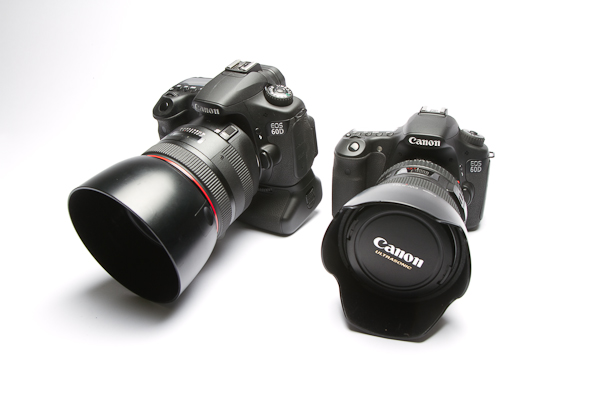
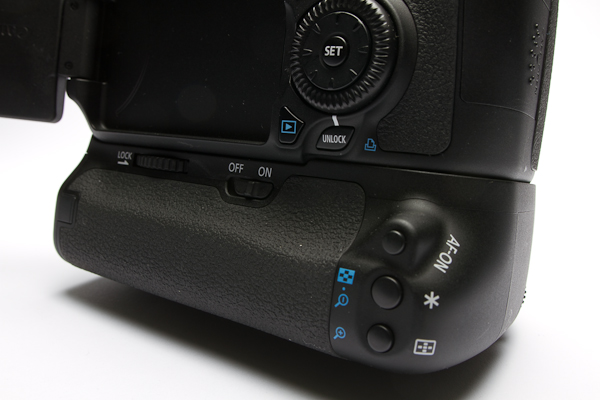
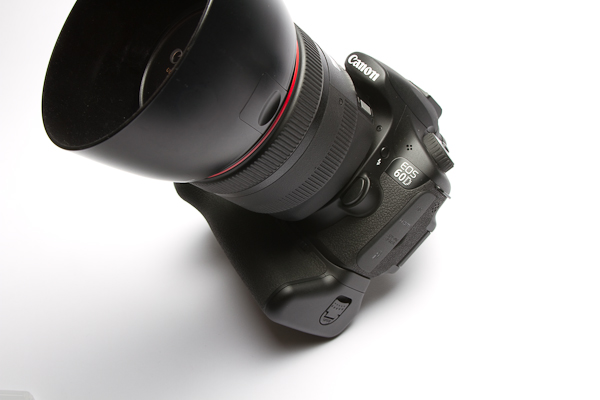
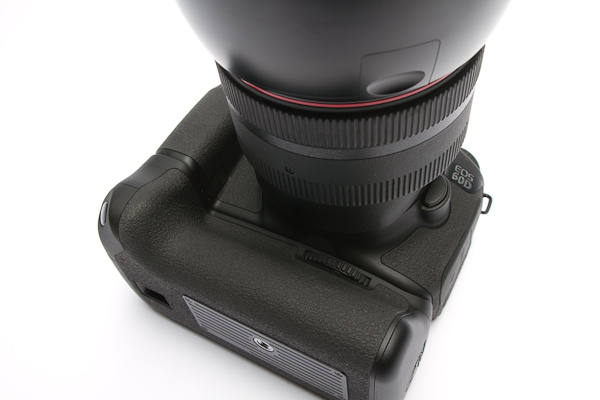
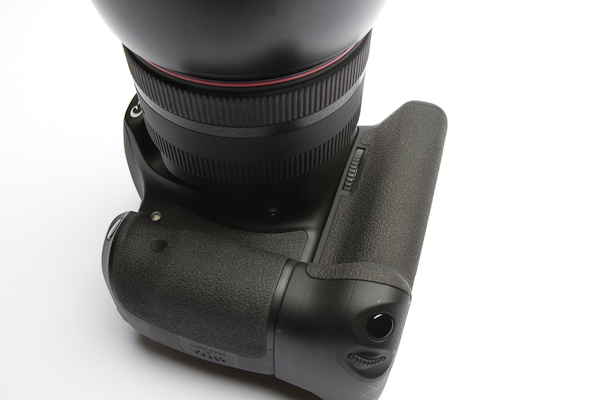
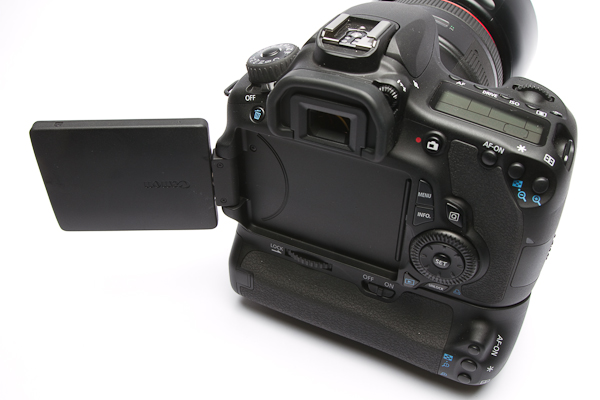
Now that the Canon 60D has had time to hit the streets, emails are coming with questions about the Canon BGE9 Battery Grip. Unfortunately it's still too early for something aftermarket, but here's a closer look at the pricier Canon BG-E9 OEM grip.

grip
find-price-button BG-E9 Battery Grip For Canon 60D

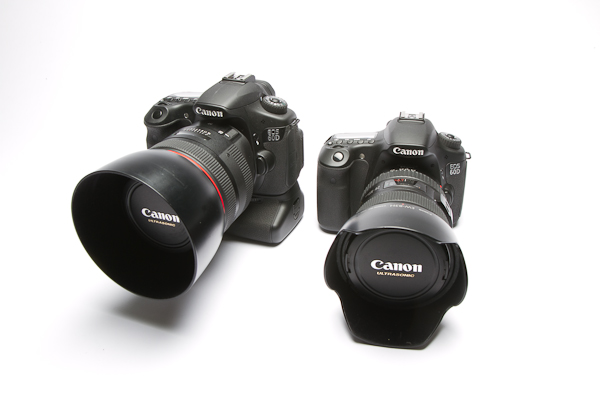
For those who were wondering about how much extra height this grip adds to the DSLR body, I have two Canon 60D's side by side. Buttons and switches are similar to other Battery Grip models, but the most different feature is that it uses the LP-E6 batteries (same as 5DMarkII & &D), but loads the battery tray in from the sides like a Canon T2i. When they said they would make a camera in between the T2i and 7D, they weren't kidding.

24 Comments

I've updated the video from the earlier post to include a Canon 7D HDMI output test (at the end of the video). Instead of just updating the old article on the Canon 60D HDMI output, I thought this Canon 7D test would be interesting enough to just re-post the results all over again. Here i'm using my Vizio LCD TV as the external display. The Canon 60D has the same results as a 5DMark II and Canon 550D/T2i. The 7D does not drop to the 480 resolution. Although the monitor is 'detecting' the 1080i output, I have heard that it's highly compressed with artifacts to be something worth capturing from. I have no interest in capturing from the HDMI port, so I haven't spent time confirming that quality. I will say though that it is a nice feature built into the Canon 7D if you're planning on using External monitors.

canon-60D
find-price-button Canon EOS 60D

canon-eos-7d
find-price-button Canon EOS 7D


11 Comments

diy-shoulder-support

Vimeo member Tim Perkins looks to be a clever DIY guy. You can see him working a DIY LCD Viewfinder on his 550D. This time Tim takes a hint from a previously shared video found here: http://cheesycam.com/tripod-to-shoulder-support/ about using a tripod as a simple 'shoulder support' and finds gold in an old Bogen 3D tripod head. Using a monopod for the shoulder support, the configuration of this Bogen 3025 3D head helps position the camera to a better viewing height as well as being offset. Looks pretty stable as is, but curious if a handle, shoulder pad, and some counterweight could add some enhancements.

Not sure if it's the same, but this is the only version that shows up:

13 Comments

A rep from EA Sports dropped in today for a quick interview about the new video game 'Need for Speed - Hot Pursuit'. Can be found here: Need For Speed - Hot Pursuit

Just thought I'd share a quick clip of an interview I thought went fairly well considering the time constraints. The rep came earlier than expected so I rushed to get something setup for the interview. Woohoo, yeah that audio is the Zoom H1 portable Audio recorder with the cheap ATR3350 LAV microphone. Not too bad for a rushed Audio interview, pretty happy with that. I had a Zoom H4n off to the side to see how that would sound, but there was too much ambient outside that ruined it. Camera left is Canon 5D Mark II with 100mm Macro IS F/2.8L (see it's not just for Macro), and camera right is Canon 7D + 24-105mm IS F/4L (the video footage isn't in this clip). The BTS footage i'm showing you was shot hand held with the Canon 60D. For lighting just used one of the cheap 800 watt Lights as the fill light, I talked about it in this article: http://cheesycam.com/new-800w-barndoor-softboxes-3pcs-lighting/

There were two other lights with a red gel to give the plain garage door something interesting. Instead of a plain background, the garage added more texture to the simple interview shot. This video hasn't had any processing done so i'm sure it looks pretty flat, soft, and desaturated. That was the profile setup on the Canon 5D Mark II. The Canon 5D Mark II was also being monitored on the Vizio LCD with DIY mount to cheap Light Stand. Well, there you go. Hope this setup is informational and helpful as the audio came out decent and the lighting added something different for a super cheap budget.

lighting-kit

20 Comments

Some of you might have already caught this video, since i'm late to post it on this blog. There's still questions about 1080 monitoring on an external LCD monitor and 480SD monitoring while in record mode. This is the same for the other Canon DSLR's. They show 1080 if just monitoring and when playing back a video clip, but will drop to 480SD while in record mode. Some people don't notice this on tiny LCD's, because the camera will maintain the same aspect ratio. Here's a look on my HDTV that i'm using as an external monitor in the studio.

I love the larger screen when shooting stuff, and it's only $169 at Costco. I have DIY monitor mount that i've made to a simple flash light stand. The only problem is you won't be traveling with this type of monitor, and you'll need a good power source handy too. For stationary shots in the studio where I don't need to travel, it gets the job done and I can focus well with it. This LCD I have is not 1080, but who needs it for monitoring since it can't maintain it anyways during recording. If you're happy with those Lilliput monitors, those LCD's don't display 1080 - I think the Lilliput is 800x400 resolution. This is a 720p LCD which I think makes the image better since it doesn't need to scale from 1080 to 480.